


Daily Weather: Forecast&Alerts
4.1258.00 Reviews
App Specs
- Version
- 1.1.10
- Updated On
- License
- Free
- Downloads
- 1,000,000+
- Developer
- RODRIGUEZCASTILLO FABIOLA
- Categories
- Weather
- Platform
- Android
Screenshots
 Analysis by AppCompare
My first week with Daily Weather: Forecast&Alerts made its appeal easy to understand: it puts the day’s conditions and a short forecast in front of me without making me hunt through screens. When rain might affect a commute or a temperature change could alter what I wear, that quick check is useful. The app is a free weather app from RODRIGUEZCASTILLO FABIOLA, and its simple purpose is easy to grasp: help me decide what the weather means for the day ahead.
The quick-check routine that makes a good first impression
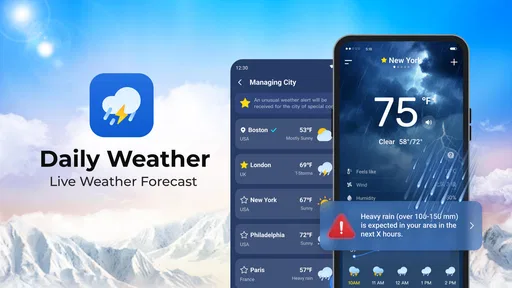
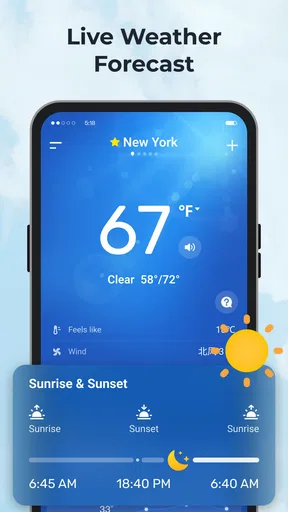
From the moment I opened Daily Weather: Forecast&Alerts, I could tell it was built with the user in mind. The interface is sleek and intuitive, with all the essential information right there at your fingertips. No more endless scrolling just to find out if it’s going to rain in the afternoon. The app greets you with a beautifully designed homepage that displays the current temperature, weather conditions, and a short forecast for the day. It’s like a personal weather concierge.
That kind of layout matters most when I’m checking the weather between other tasks rather than sitting down to study it. I can start with the current conditions, then look further ahead if my plans need more thought. A useful habit is to check at the same decision points each day: before leaving home, before an outdoor errand, and again if the afternoon plan is flexible. That is more practical than repeatedly opening any forecast app without a specific question in mind.
Planning beyond the next few hours
Now, let’s talk features. This app isn’t just about showing you the weather; it's about keeping you prepared for whatever the skies might throw your way. Here’s a quick look at what you can expect:
- Real-time Updates: Get notifications about sudden weather changes, so you’re never caught off guard.
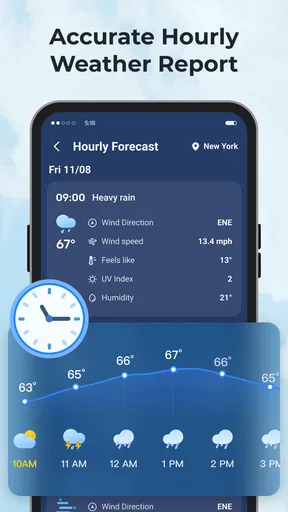
- Hourly and Weekly Forecasts: Plan your day or week with precision by checking detailed predictions.
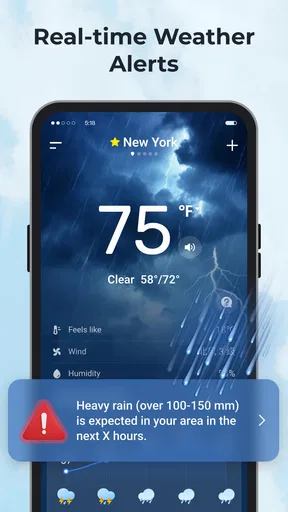
- Severe Weather Alerts: Stay safe with timely alerts about extreme weather conditions.
- Customizable Widgets: Add widgets to your home screen for quick weather updates at a glance.
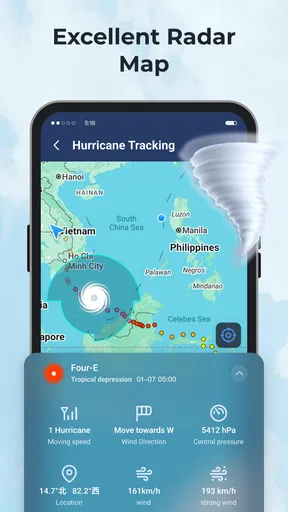
- Interactive Radar: Track storms and weather patterns with an easy-to-use radar map.
For a normal workday, I’d use the short forecast to decide what to wear, the hourly view to judge whether an outdoor lunch or school pickup could be uncomfortable, and the wider outlook to avoid scheduling a long outdoor job on a questionable day. The most useful move is to treat these views as different tools rather than as competing promises: an hourly forecast supports near-term choices, while a weekly outlook is better for spotting broad patterns than locking in a precise plan.
Radar can help answer a different question from a forecast: whether a patch of weather appears to be moving toward the place I’m watching. I would use it as context, not as a guarantee about exactly when rain will begin at my doorstep. For a walk or drive, pairing a radar glance with the hourly forecast is a more sensible workflow than relying on either screen alone. That small distinction makes the app more useful without encouraging false confidence.
Setting it up for places that matter
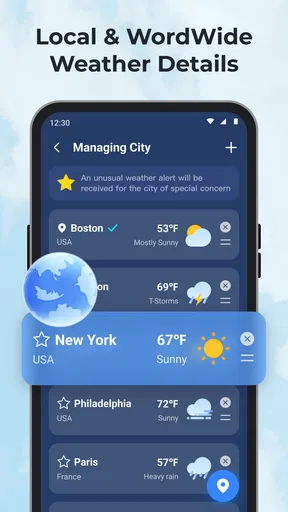
Setting up the app is a breeze. Once downloaded, it asks for your location to provide accurate local forecasts. You can also add multiple locations, which is super handy if you’re planning a trip or just want to keep an eye on the weather in other places. The settings menu lets you customize notifications and choose between different themes. Personally, I love the dark mode—it’s easy on the eyes, especially during those late-night weather checks.
Worth Reading Before You Choose

EA SPORTS FC Mobile 26 Is a Bigger Football Game, but It Takes Time

Flipboard Shows What News Apps Must Do Beyond the Feed

Switching to Android Auto Means Rethinking Your Driving Routine

Google Calendar Makes a Crowded Week Easier to Manage

Ludo King Makes the Most of the Minutes Between Plans

Baby Panda World Brings Quick Play to Modern Phones, but Its Game Library Feels Busy
Adding a second place is especially practical for people who split their time between home and work, regularly visit family, or are checking conditions before a trip. I’d keep the list focused on locations that affect an actual decision; a long collection of cities can turn a quick glance into a search task. If I’m away from home, I’d check the destination directly rather than assuming that conditions nearby are a good substitute.
Widgets are best treated as a shortcut, not as a replacement for opening the app when a decision matters. They can make routine checks less effortful, but a compact glance has less room for context than the full forecast or radar. My approach would be to use a widget for the everyday overview and open the relevant screen when timing, travel, or outdoor plans depend on more detail.
What keeps it useful after the first week
After the first week, I’d judge Daily Weather less by how many screens I’ve explored and more by whether it makes a recurring decision easier. I’d keep only the locations and alerts that change my plans, then check the forecast at moments when I can still act on it. That light-touch routine is what turns a handy first impression into lasting value.
From novelty to a dependable habit
The first few days with a weather app often involve exploring its screens; lasting value comes from whether it earns a place in a routine. Daily Weather’s mix of a current snapshot, forward-looking forecasts, alerts, and radar gives me several reasons to return, but I wouldn’t use every feature every day. On an ordinary day, the home screen may be enough. When plans depend on changing conditions, the other views have a clearer purpose.
Picture a weekday when I need to walk to the station, take care of an errand later, and decide whether to carry a jacket. I can check the day’s overview before leaving, use the hourly forecast to think about the errand, and look at radar if rain seems likely. If conditions are severe, alerts are a reason to pay attention rather than wait for my next manual check. That is a realistic pattern of use: a few targeted checks connected to choices I already have to make.
For someone who works outdoors, commutes on foot or by bike, or often has plans that depend on the sky, the repeated convenience can justify keeping the app installed. It can also help someone who looks after children or older relatives and wants to think ahead about weather during outings. By contrast, if I only need a general idea of whether it is warm or cold, a built-in phone weather screen may already do enough. The extra views have value only when I use them.
How it compares with familiar weather options
Compared with the default weather app on a phone, Daily Weather offers a more dedicated place to check conditions, with radar, multiple locations, widgets, and severe-weather alerts among the features described here. That broader set can suit people who actively plan around weather. A built-in app may still be the better choice for someone who wants the least setup and only checks the temperature occasionally.
It also serves a different role from a specialist forecasting service aimed at people who need technical detail for work or outdoor activities. Daily Weather’s appeal is its accessible mix of day-to-day information, not a claim that it replaces expert tools or official safety guidance. If I were making a high-stakes decision about hazardous conditions, I would not treat a consumer forecast as my only source. For routine clothing, errands, and casual plans, the simpler approach is often exactly what I want.
Accuracy, alerts, and sensible expectations
There are a ton of weather apps out there, so what makes this one special? For me, it’s the combination of accuracy and user experience. The app consistently delivers precise forecasts, which is crucial when you’re trying to decide whether to bring that raincoat. Plus, the layout is user-friendly, ensuring that even the least tech-savvy among us can navigate it with ease.
Weather predictions are still predictions, and local conditions can shift faster than a general outlook suggests. I’d use a forecast to make a practical choice, then leave room for uncertainty when a plan is difficult to change. If I’m planning an event outdoors, a weekly view can help me identify a possible concern, but I’d revisit the nearer-term forecast before making a final call. That is a more dependable habit than treating an early outlook as settled fact.
Notifications can be helpful when I may not be checking the screen, but too many alerts can make any app feel like an interruption. I’d tailor them to the kinds of changes I genuinely need to know about and keep the rest of my routine manual. A good alert setup should reduce surprise without training me to dismiss every notification. If I find myself ignoring them, that is a sign to simplify the settings rather than switch on more.
Another standout feature is the community feedback. Users can report weather conditions in real-time, contributing to the app's accuracy. It’s a small touch, but it makes the app feel more personal and reliable.
Community reports are most useful to me as an extra point of context, not a substitute for the forecast. A report can describe what someone is experiencing in one place, while conditions may differ a short distance away. I’d compare it with the broader forecast and radar before changing a plan. That combination is a practical way to benefit from local observations while remembering that a single report does not describe an entire area.
The ongoing effort and possible fatigue
Keeping the app useful does not need to become a project. I would choose the locations I actually care about, decide which alerts deserve my attention, and then let the routine settle. The main maintenance is occasional housekeeping: removing places I no longer check and adjusting notifications if they become noisy. If a widget stops helping because I rarely look at it, I can remove it without losing the option to open the forecast when needed.
The main source of fatigue is not necessarily the number of features, but the temptation to check too often. Rechecking the same forecast every few minutes rarely improves a decision, especially when I have no new information to act on. I’d check when plans are made or conditions could affect what I’m doing, then get on with the day. The app works better as a quiet planning aid than as a stream of weather to monitor constantly.
Its other trade-off is that a convenient all-in-one view can encourage me to rely on one app for every weather question. For ordinary planning, that is reasonable. For a serious weather threat, or a specialized activity where timing and local conditions matter greatly, I would consult appropriate official or specialist sources too. Knowing when the app is enough—and when it is not—is part of using it well.
Who is likely to keep it installed
Daily Weather is a strong fit for people who make small daily decisions based on the forecast and appreciate having several ways to check it. The home screen suits quick checks, multiple locations help with travel or family commitments, and radar offers a visual reference when rain is a concern. Its audience is less likely to be someone who wants a highly technical meteorological workspace or who already gets all the information they need from a simpler default app.
One common question is whether it can help with trip planning. Multiple locations and the weekly outlook make it useful for an initial check, while the nearer-term forecast is the better reference as departure approaches. Another is whether alerts replace checking conditions yourself: I would not rely on that. Alerts complement a regular glance, and severe conditions deserve attention from trustworthy local sources as well.
People also often wonder whether a widget is enough for daily use. It may be if the goal is a quick snapshot, but I’d open the app for hourly timing, a wider outlook, or radar. And if the forecast changes, I would treat that as a reason to reassess plans, not as evidence that the app has failed; weather can be uncertain, particularly when looking further ahead.
Verdict after the novelty fades
In the end, Daily Weather: Forecast&Alerts is more than just a weather app; it’s a trusty companion that helps you tackle each day with confidence. It's perfect for anyone who wants to stay informed and prepared, whether you’re a weather enthusiast or just someone who doesn’t want to get caught in the rain without an umbrella again. With its user-friendly design and comprehensive features, this app is a no-brainer for anyone who likes to keep an eye on the sky.
Its long-term value depends on whether those checks genuinely shape my choices. The app is free, rated for Everyone, and has a 4.8 average from around 1.7 thousand ratings, with over 500 thousand installs. It was released on September 15, 2025, and version 1.0.29 supports devices running Android 7.0 or later. Those details make it easy to consider, but they are not what would keep it on my phone; a low-friction routine and useful alerts matter more.
So, if you’re ready to take control of your weather woes, give Daily Weather: Forecast&Alerts a try. You won’t regret it!
I’d recommend it to a friend who checks the weather because the answer changes what they do, not simply because they want another app on their home screen. Start with the locations you need, keep notifications purposeful, and use the different forecast views for the decisions they suit. If you prefer a bare-minimum glance or need specialist-grade guidance, another option may fit better. For everyday planning, though, it has a clear chance to earn lasting space by making weather checks quick and actionable.
Pros
- Accurate forecasts with real-time updates.
- User-friendly interface with intuitive navigation.
- Customizable alerts for severe weather.
- Detailed radar maps for precise tracking.
- Multiple location support for frequent travelers.
Cons
- Ads can be intrusive during navigation.
- Premium features require a subscription.
- Limited widget customization options.
- Occasional delays in loading radar maps.
- Some features need stable internet connection.
FAQs for Daily Weather: Forecast&Alerts
What features does Daily Weather: Forecast&Alerts offer?
Daily Weather: Forecast&Alerts provides real-time weather updates, detailed forecasts, and severe weather alerts. Users can access hourly and weekly forecasts, radar imagery, and customizable notifications. The app also offers widgets for quick home screen access and supports multiple locations, making it a comprehensive tool for staying informed about weather conditions.
Is Daily Weather: Forecast&Alerts free to use?
Yes, Daily Weather: Forecast&Alerts is free to download and use. However, it may offer in-app purchases or a premium version that unlocks additional features such as ad-free browsing, advanced radar options, and enhanced customization settings for notifications and widgets. Users can choose to upgrade based on their preferences.
How accurate is the weather data in Daily Weather: Forecast&Alerts?
The app sources its data from reliable meteorological services, ensuring high accuracy in weather predictions. While no forecast can be 100% accurate, Daily Weather: Forecast&Alerts provides well-regarded precision in its updates and alerts, helping users plan their activities with confidence. Regular updates ensure users receive the latest information.
Can I customize alerts in Daily Weather: Forecast&Alerts?
Yes, the app allows users to customize alerts according to their preferences. You can set notifications for specific weather conditions like rain, snow, or severe weather alerts. Additionally, users can adjust the frequency and type of alerts they wish to receive, ensuring they are only notified about the most relevant weather changes.
Does Daily Weather: Forecast&Alerts work offline?
Daily Weather: Forecast&Alerts requires an internet connection to update weather data and provide real-time alerts. While some previously downloaded data might be accessible offline, users will need to reconnect to the internet to receive the latest forecasts and updates. It's recommended to check for updates regularly for the most accurate information.


